Restaurant POS, kitchen display and inventory
Food Times
A restaurant operating system for the Gulf: point of sale for dine-in, take-away and delivery, live kitchen screens, menus, inventory and finances in one place.
- Roles: cashier, kitchen, manager, admin
- 4
- Order types: dine-in, take-away, delivery
- 3
- What we built
- Point of saleKitchen displayManagement dashboardAdmin consoleNode.js API
In development · Phase 2
Want a closer look before launch?
Request a walkthrough of the POS, kitchen display and management dashboard with a demo restaurant.
The problem
Restaurants in Oman and Saudi Arabia were running the floor, the kitchen and the books on separate tools: paper tickets to the kitchen, spreadsheets for stock, and end-of-day cash counted by hand. Orders got lost between the counter and the grill, and owners couldn't see what was selling or what was running out.
What we built
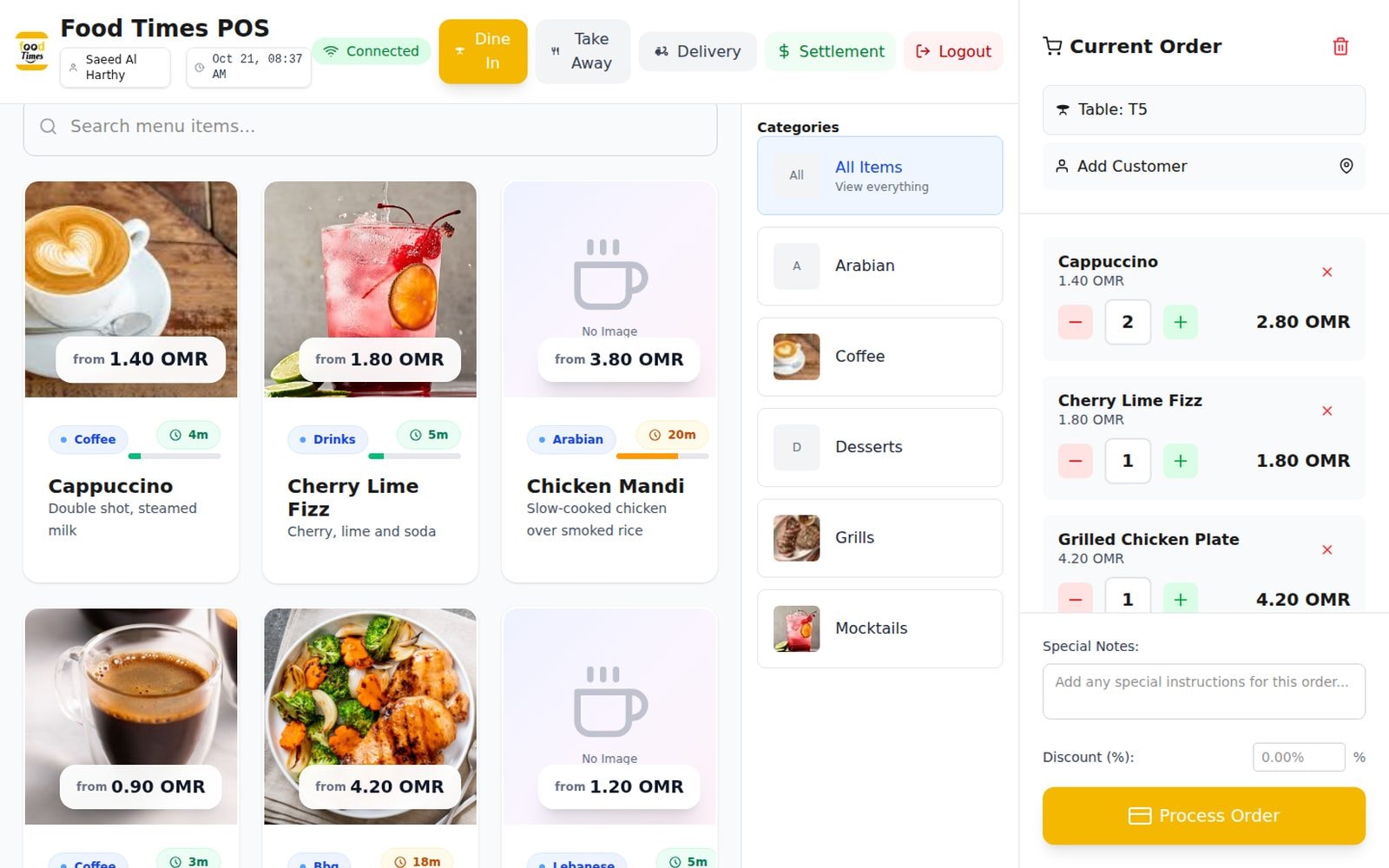
We built one system every role uses. Cashiers and waiters take orders from a table map, a take-away queue or a delivery list; each item goes straight to the right kitchen station, where cooks see a live queue with timers and mark dishes as preparing and ready.
Managers run the menu (categories, items, photos and prep times), tables and areas, staff and kitchen sections, and track inventory with stock movements and low-stock alerts. Finances show revenue trends, best sellers, payment methods and daily settlements. A Node.js API on PostgreSQL pushes every change to every screen in real time.
Key features
- 01Table map with live status: available, occupied, reserved, needs cleaning
- 02Dine-in, take-away and delivery orders from one screen
- 03Orders routed to the right kitchen station, with timers
- 04Kitchen display: start preparing and mark ready, updated live
- 05Menu management with categories, photos, prep times and food types
- 06Inventory products, stock in and out, and low-stock alerts
- 07Revenue trends, best sellers and payment methods
- 08Daily settlement of cash, card and online payments
- 09Staff accounts with roles and kitchen assignments
- 10Multi-country setup with local currency, cities and tax
Inside the product.
12 images
Taking an order. Dine-in order for table T5 with menu photos, prices and prep times. Table map. Every table's status, current order and payment at a glance. Kitchen display. The grill station's live queue, with timers and one-tap status. Take-away queue. Ready and preparing orders, with print, modify and complete. Management dashboard. Areas, tables, menu categories and quick actions. Finances. Revenue trend, best sellers and payment methods. Orders. Every order with type, status, table and total. Menu. Categories with photos, ready for the POS. Inventory. Stock levels, low-stock alerts and recent movements. Areas and tables. Dining areas and table capacities. Staff. Roles, kitchen assignments and status. Website. The Food Times product site.
Tech stack
- Web
- Next.jsReactTypeScriptRechartsMotion
- Backend
- Node.jsExpressPostgreSQLSocket.IOZod
- Platform
- JWT authSwagger API docsRole-based access
Results
- Every order reaches the kitchen the moment it's placed.
- Owners see sales, stock and settlements without a spreadsheet.
- Phase 2 adds receipts, customer loyalty and deeper inventory costing.
Next project
Unityware
Free, no obligation
Have something similar in mind?
Book a free consultation and we'll conduct a meeting to talk it through, or start with a free audit. No obligation either way.